Excel Inventory Template: Formulas That Update Stock From Every Sale
Excel inventory template: the four tabs, the SUMIFS formulas that update stock from every sale, and a craft fair weekend worked through 37 sales.
By Ultimate Inventory Tracker by Cosmo Suite · Editorial policy
Published · 9 min read
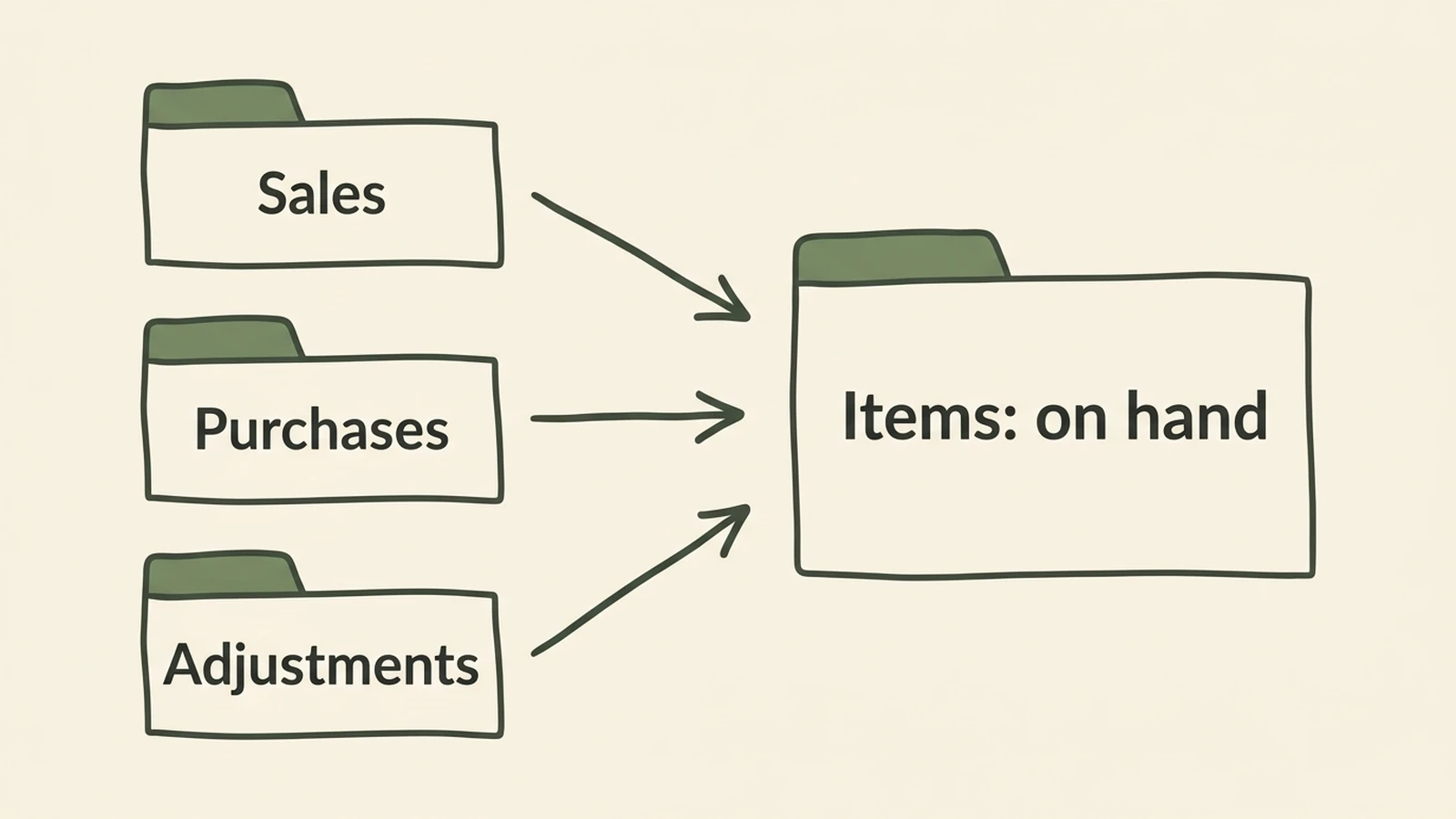
An Excel inventory template is a workbook with two kinds of tab: an item list that shows what you have, and log tabs where you record every sale, purchase and correction. The stock number comes from the logs by formula, so you never type it.
Most free templates stop at the item list. You type a quantity, you type a new one after a sale, and by the second weekend it no longer matches the shelf. Usually the problem is a number that has to be typed in two places.
This post covers the four tabs, the five formulas that matter, one craft fair weekend worked through, and what Excel cannot do however good the template is.
In Short: one item list, three log tabs, SUMIFS for on hand. Type each sale once.
The Excel Inventory Template Layout: Four Tabs, Five Formulas
In short, the layout is four tabs: Items, Sales, Purchases and Adjustments. Items holds one row per product or supply, and the other three hold one row per movement. Every number you read comes from those rows.
The formula box. On each log tab, column A is the item name, B the date, C the quantity and D the place. On Items, column A is the item, E is on hand, F is the reorder level and G is the unit cost.
| What it gives you | Formula (row 2 of Items) |
|---|---|
| On hand | =SUMIFS(Purchases!C:C,Purchases!A:A,$A2)-SUMIFS(Sales!C:C,Sales!A:A,$A2)+SUMIFS(Adjustments!C:C,Adjustments!A:A,$A2) |
| Status flag | =IF(E2<=F2,"Running low","In stock") |
| Stock value, for your own tracking | =E2*G2 |
| Sold at one place | =SUMIFS(Sales!C:C,Sales!A:A,$A2,Sales!D:D,"Market") |
| Low-stock colour | Conditional formatting rule =$E2<=$F2 on the whole row |
Microsoft describes SUMIFS as a function that "adds all of its arguments that meet multiple criteria". That is the job here: pick out one item's rows from a long log and add them up.
Log what you already own as the first row on Purchases. Enter a count correction on Adjustments, as a negative number if you have fewer than the sheet says.
What Free Excel Templates Do, and Where a Typed Quantity Breaks
Free Excel templates are workbooks that give you a layout and some formulas. Many still expect you to type the quantity after each sale, which is where the count starts to drift.
Microsoft's gallery says you can "track values and stock levels using the built-in formulas that calculate totals automatically", and it lists an "Inventory list with reorder highlighting" among its files. Those are useful starting points. The question to ask of any file is narrower: when you log a sale, does the stock change, and does it change at the right place?
Ply describes the sturdier shape: "a product list, stock-in and stock-out log, formulas for current quantities, and reorder alerts using conditional formatting". That is the layout above. Ply also lists the limits, among them manual data entry, version control and weak multi-location tracking, and we agree with all three. Our full list of columns is in the inventory spreadsheet guide.
A quantity you overwrite also loses its history. Type 12 over 14 and nothing records why. If you are tired of fixing the number after every sale, a ready-made file where each sale updates the count removes the double entry.
Excel Inventory Template: What to Use When
However, choose the simplest option that still changes the count when you log a sale. A plain list suits a home shelf. A logged workbook suits a seller. An app suits you when you need scanning or a shop link.
| Option | What it does | Best for |
|---|---|---|
| Plain list | Item and quantity you type | Home contents, one shelf |
| Free Excel template | Item list with totals and reorder highlighting; check whether a log changes the count | Learning the layout, few items, one place |
| Logged workbook (this post) | On hand comes from sales, purchases and adjustments | A seller with one to three places |
| Inventory app | Barcode scanning, shop connection, several users | A connected shop, a team |
The middle two rows look alike in a screenshot. The difference only shows when you log a sale and watch what moves.
The Fair Weekend, Worked Through
Here is one craft fair weekend as an example. It is a made-up maker with one product, not a customer result.
You own 90 soy candles. On Friday you pack 60 for the fair and log a transfer of 60 from Home to Market. Saturday you sell 21 and Sunday 16, which makes 37. On Monday you type the tally sheet into Sales, one row per sale or one row per day and item.
For example, read the sheet on Monday. Total on hand is 90 − 37 = 53. The Market place holds 60 − 37 = 23. You pack the 23 back and log a transfer of 23 from Market to Home. Market drops to 0 and Home goes back to 53.
The Market formula needs three terms: transfers in, minus transfers out, minus sales at that place.
=SUMIFS(Transfers!C:C,Transfers!A:A,$A2,Transfers!E:E,"Market")-SUMIFS(Transfers!C:C,Transfers!A:A,$A2,Transfers!D:D,"Market")-SUMIFS(Sales!C:C,Sales!A:A,$A2,Sales!D:D,"Market")
Home needs its own version, plus Purchases and Adjustments by place. That is the point where a hand-built workbook gets long.
Build It in Excel in Five Steps
You can build this in an evening. Do the steps in order, and test each one with a sale you can check by hand.
Step 1: Make the four tabs
Name them Items, Sales, Purchases and Adjustments. Give every log tab the same columns: item, date, quantity, place. Freeze the top row.
Step 2: List your items
Put one item per row on Items with a code, category, unit, reorder level and unit cost. Spell each name once and exactly. SUMIFS matches text, so "Soy Candle" and "Soy Candle " (with a trailing space) are two different items, and the second one returns 0 without an error.
Step 3: Add drop-downs to the logs
On each log tab select the item column, then Data, Data Validation, List, and point the source at the Items name column, for example =Items!$A$2:$A$200. Do the same for place. Drop-downs stop the spelling slips that break SUMIFS.
Step 4: Add the formulas
Paste the on hand and status formulas from the formula box into row 2 of Items and fill them down. Log opening stock as a first Purchases row, then add one test sale and check that on hand falls by exactly that amount.
Step 5: Add the low-stock colour
Select the Items rows, choose Conditional Formatting, New Rule, Use a formula, and enter =$E2<=$F2. Pick a fill. Rows turn colour when on hand reaches the reorder level.
What Excel Cannot Do, Whatever the Template
However, the honest limits are the same for every Excel file, such as no shop link. It does not connect to an online shop or a till, and it does not scan barcodes. You log or paste each sale. Excel also cannot count what was sold but never logged.
Accuracy depends on the routine:
- Log sales on the day, or from the tally sheet on Monday.
- Spend 15 minutes a week on the running-low flags.
- Count the shelf once a month and enter any gap as an adjustment with a reason.
Version control matters too, for example when two people keep two copies of the file: the counts split. Keep one file in one place.
One boundary: the stock value column is for your own tracking. For how inventory is treated for taxes, read the Inventories section of IRS Publication 334, Tax Guide for Small Business and ask a tax professional about your own case.
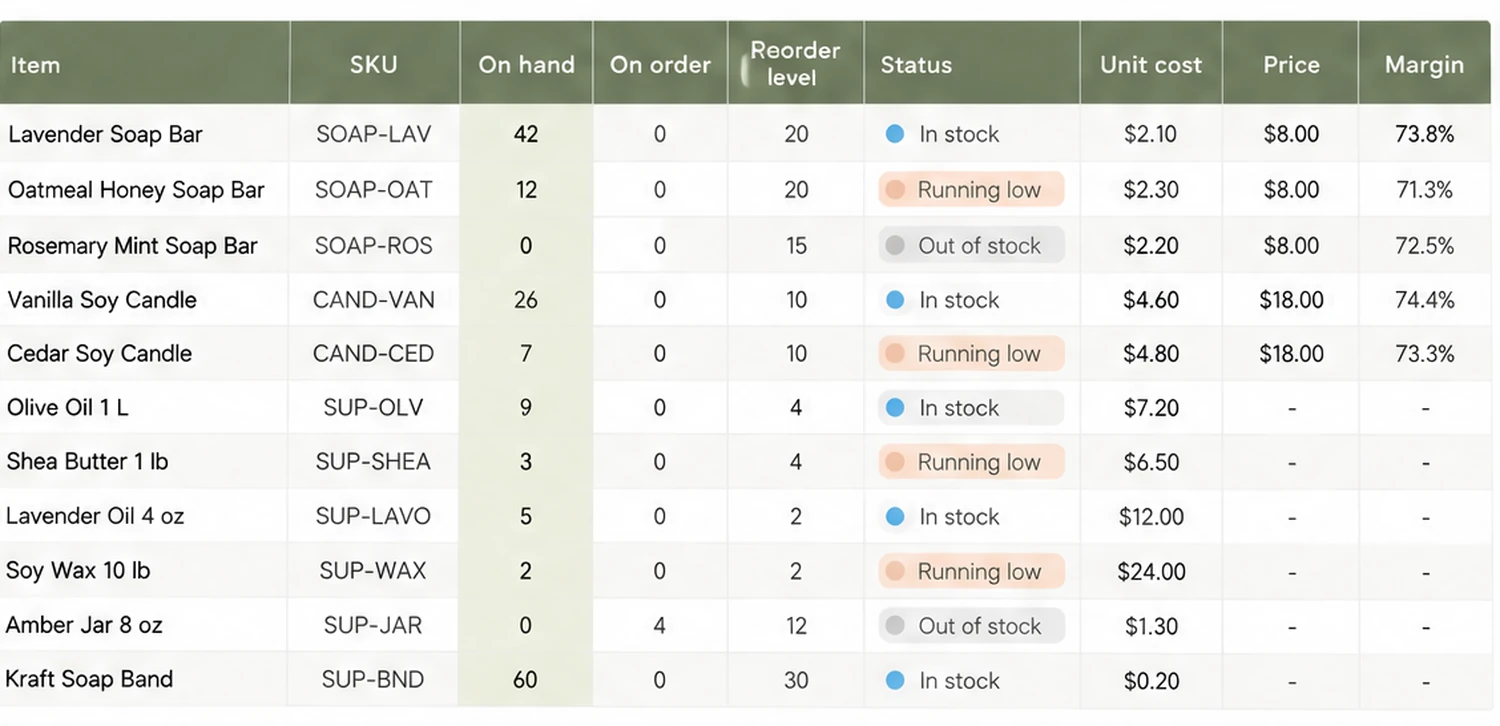
For makers there is a second inventory in the same workbook: the wax, oils and jars that go into each piece. A plain item list cannot draw those down when you make a batch. A file with batches and recipes already linked does.
How the Ultimate Inventory Tracker Handles This
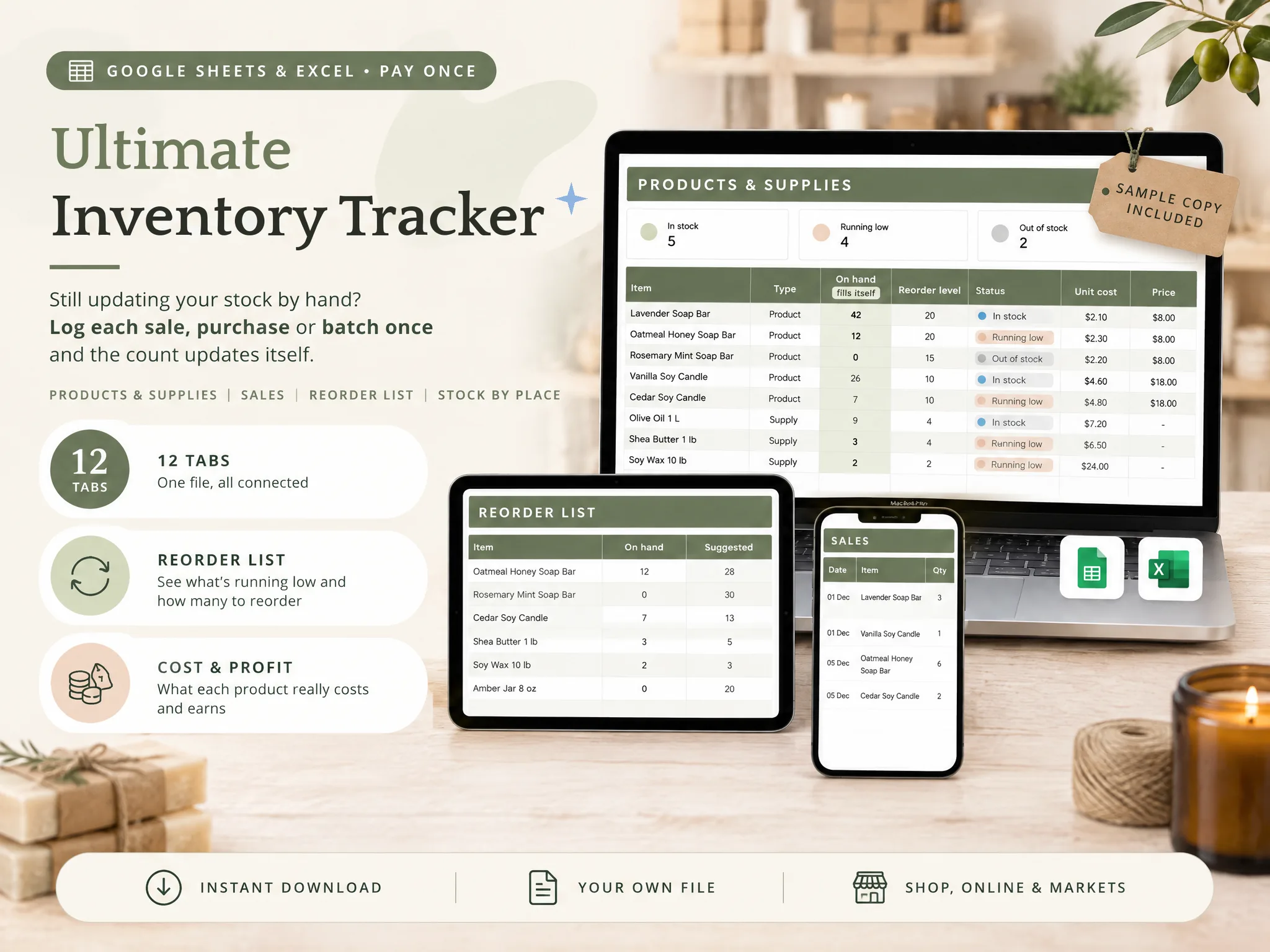
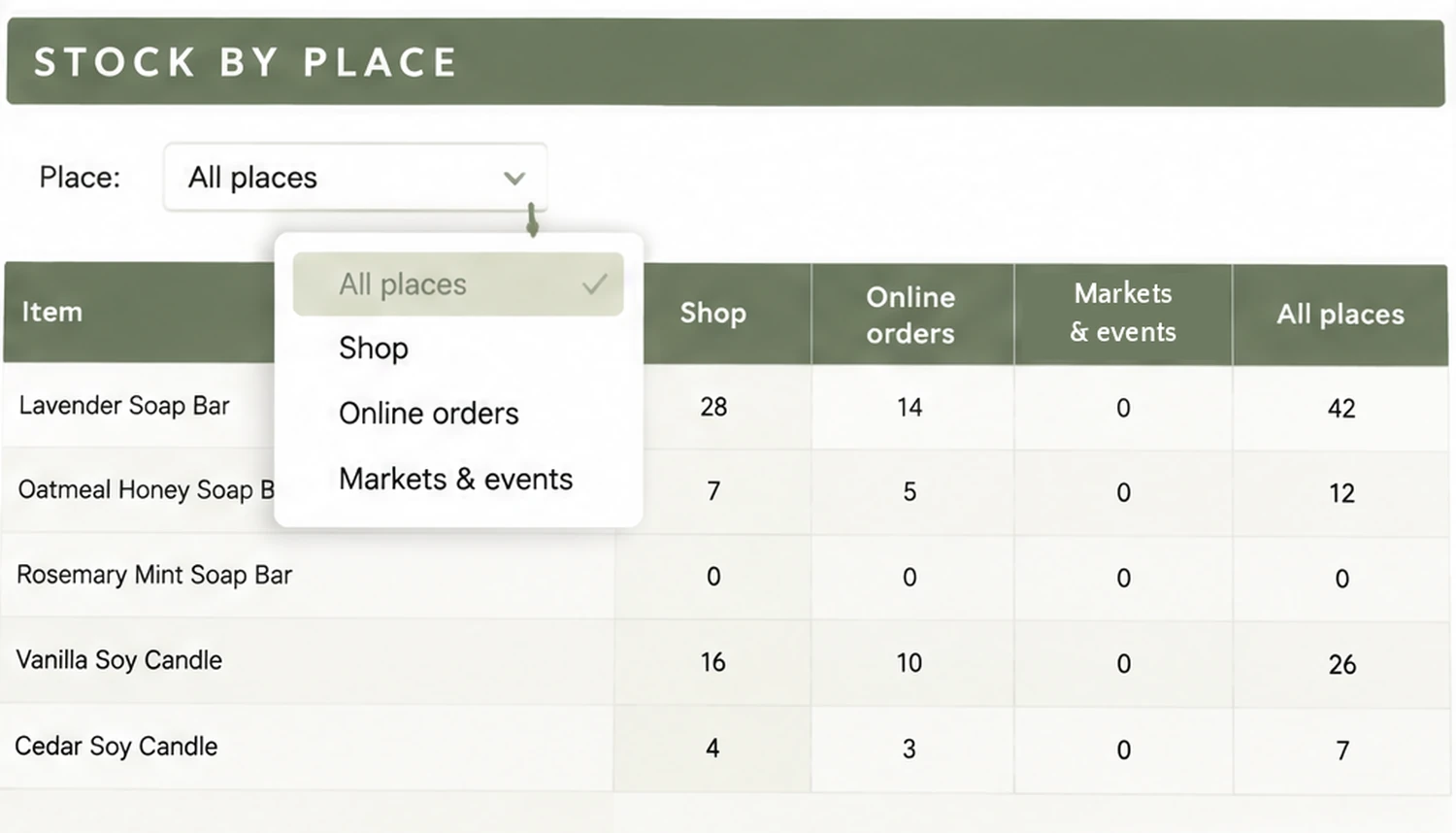
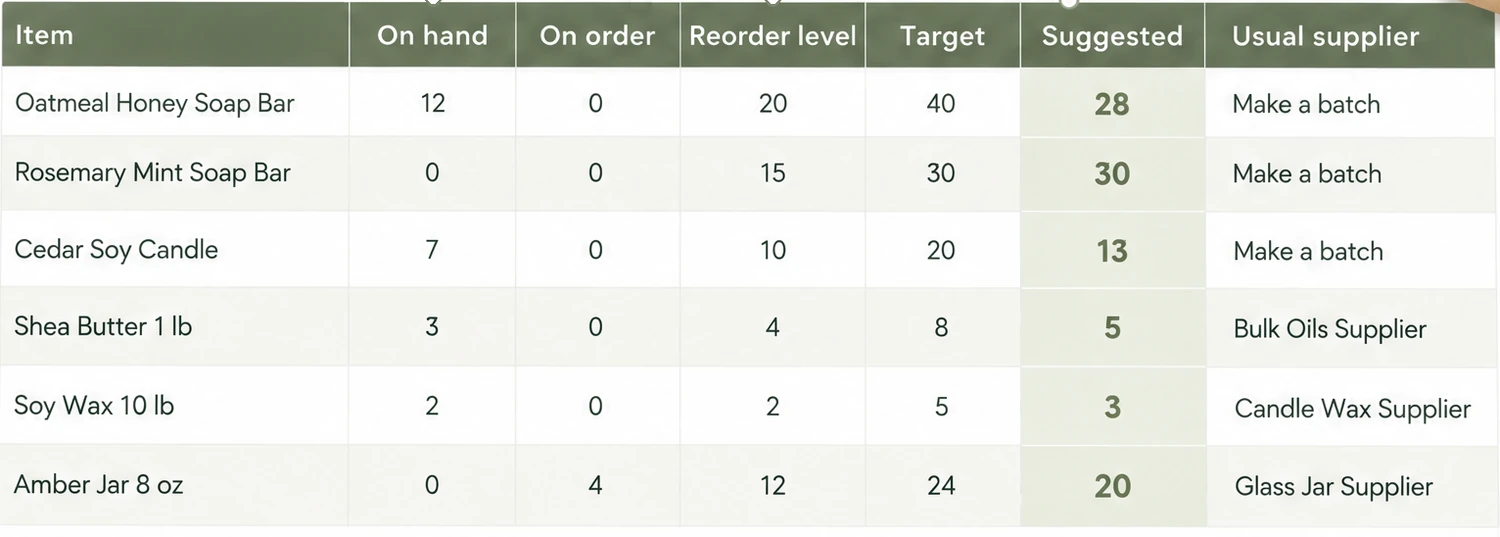
The Ultimate Inventory Tracker (by Cosmo Suite: one Google Sheets and Excel file, 12 tabs, $9 once) is this layout already built and linked. You log a sale, a purchase, an adjustment, a transfer or a batch once, and on hand, the Reorder List and stock by place follow from that row.
For makers, a Recipes tab holds the supplies in one finished piece and Batches takes supplies out and puts finished pieces in. Cost and profit per product are in the file for your own tracking, not as tax figures. It comes as a sample copy with a small maker's example and as a clean copy, plus printable pages for a market-day tally and a stock count.
It does not connect to a shop or a till and does not scan barcodes. If you would rather start with a linked inventory file than build the tabs yourself, it is a one-time purchase.
We make this file, so weigh our view accordingly. We checked Microsoft's and Ply's pages on 8 October 2026 and worked the figures above by hand. Our editorial policy explains how we fact-check, our about us page says who writes these posts, and you can contact us through the site if something here is wrong.
Frequently Asked Questions
Is there a free Excel inventory template with formulas?
Yes. Microsoft's template gallery has several, including an inventory list with reorder highlighting, and its page says the built-in formulas calculate totals automatically. Check one thing before you pick: does logging a sale change the stock on hand, or do you type the new quantity yourself? The layout in this post does the first.
What formula do I use to update stock in Excel?
Use SUMIFS. Add up what came in for the item on your Purchases tab, subtract what went out on the Sales tab, and add or subtract the Adjustments tab. Each tab holds one row per movement, so the on hand cell is always a result and you never type over it.
How do I make Excel warn me when stock is low?
Add a status column with =IF(E2<=F2,"Running low","In stock"), then use conditional formatting with the rule =$E2<=$F2 to colour the whole row. The flag only shows on screen. Excel won't send you an email or a text when an item drops below its reorder level.
Can an Excel inventory template track more than one location?
Yes, if every log row carries a place. A SUMIFS formula with a place condition then gives the count for the shop, the stall or the stockroom. It gets heavy once you add transfers between places, because each place needs its own in, out and sold terms.
Can Excel scan barcodes or connect to my online shop?
No. An Excel template, ours included, does not scan barcodes and does not connect to an online shop or a till. You type or paste each sale. If you need scanning or a live shop link, an inventory app is the better tool.
Should I use Excel or Google Sheets for inventory?
Use the one you open every day. Excel works offline. Google Sheets opens on a phone at a stall. SUMIFS and IF work the same in both, so a layout built in one moves to the other without rewriting the formulas.
Frequently asked questions
Is there a free Excel inventory template with formulas?
Yes. Microsoft's template gallery has several, including an inventory list with reorder highlighting, and its page says the built-in formulas calculate totals automatically. Check one thing before you pick: does logging a sale change the stock on hand, or do you type the new quantity yourself? The layout in this post does the first.
What formula do I use to update stock in Excel?
Use SUMIFS. Add up what came in for the item on your Purchases tab, subtract what went out on the Sales tab, and add or subtract the Adjustments tab. Each tab holds one row per movement, so the on hand cell is always a result and you never type over it.
How do I make Excel warn me when stock is low?
Add a status column with =IF(E2<=F2,"Running low","In stock"), then use conditional formatting with the rule =$E2<=$F2 to colour the whole row. The flag only shows on screen. Excel won't send you an email or a text when an item drops below its reorder level.
Can an Excel inventory template track more than one location?
Yes, if every log row carries a place. A SUMIFS formula with a place condition then gives the count for the shop, the stall or the stockroom. It gets heavy once you add transfers between places, because each place needs its own in, out and sold terms.
Can Excel scan barcodes or connect to my online shop?
No. An Excel template, ours included, does not scan barcodes and does not connect to an online shop or a till. You type or paste each sale. If you need scanning or a live shop link, an inventory app is the better tool.
Should I use Excel or Google Sheets for inventory?
Use the one you open every day. Excel works offline. Google Sheets opens on a phone at a stall. SUMIFS and IF work the same in both, so a layout built in one moves to the other without rewriting the formulas.