Inventory Spreadsheet: The Columns You Need and How to Stop Updating Stock by Hand
Inventory spreadsheet: the 9 columns to set up first, the formulas that keep stock on hand right, and a maker's month worked through 41 sales and 2 batches.
By Ultimate Inventory Tracker by Cosmo Suite · Editorial policy
Published · 9 min read
An inventory spreadsheet is a sheet that tells you how many of each item you have, and a good one works that number out for you. The count should come from your sales and purchases, not from whatever you last typed into the cell.
Most sellers start with a plain list of item, quantity and price, and it works for about a week. Then a sale at the market, an order online and a delivery from a supplier all need to change the same number, and each one is typed in by hand. The count drifts, and the first sign is a sold-out item you thought you still had.
The fix is small: keep a short list of items, log every movement once on its own tab, and let formulas do the adding. Below are the nine columns to set up first, the formulas behind them, one maker's month worked through, and the point where a spreadsheet stops being the right tool.
In Short: one row per item, one log row per sale or purchase, and a formula for on hand. Never type the count.
The Nine Columns an Inventory Spreadsheet Needs First
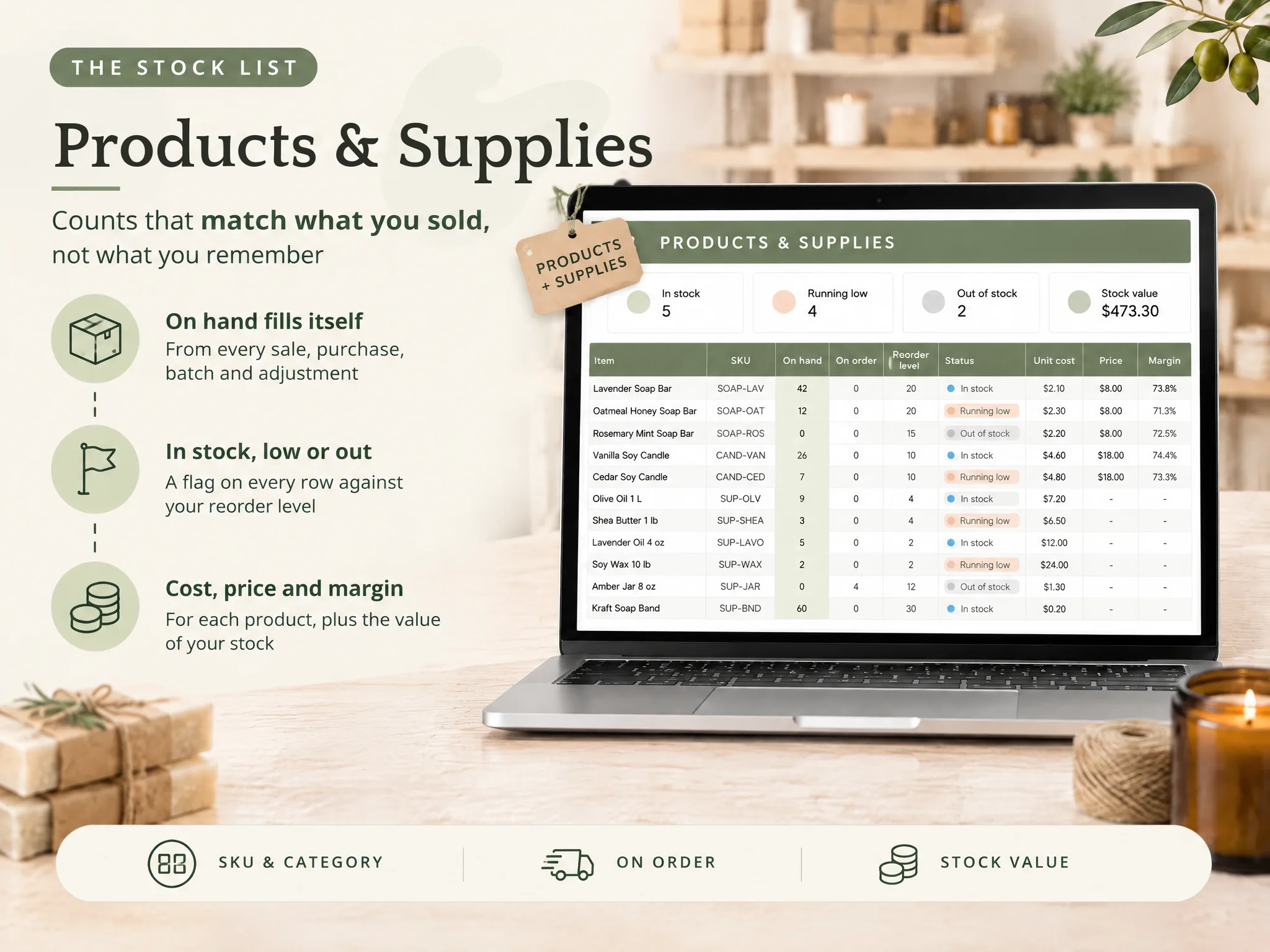
You need nine columns on the item list: item, SKU or code, category, unit, on hand, reorder level, unit cost, price and place. Eight of them you type once. On hand is the one you never type.
Ply's guide describes the usual shape well: "a product list, stock-in and stock-out log, formulas for current quantities, and reorder alerts using conditional formatting". That skeleton is right, and the part most home-made sheets skip is the log, which is why their count ends up as a typed number instead of a result.
| Column | What goes in it | Typed or formula |
|---|---|---|
| Item | "Lavender Soap Bar", "Soy Wax 10 lb" | Typed once |
| SKU or code | A short code you will recognise | Typed once |
| Category | Soap, candles, supplies | Typed once (dropdown) |
| Unit | Each, oz, g, case | Typed once |
| On hand | Received (opening stock counts as a first purchase), minus sold, plus or minus adjustments | Formula |
| Reorder level | The count at which you buy or make more | Typed once |
| Unit cost | What one unit costs you, for your own tracking | Typed, updated on purchase |
| Price | What you sell one for | Typed once |
| Place | Shop, online orders, markets and events | On each log row |
The formula box. With a Sales tab, a Purchases tab and an Adjustments tab, on hand for the item in row 2 of the item list (column E in the table above) is:
=SUMIFS(Purchases!C:C, Purchases!A:A, A2) - SUMIFS(Sales!C:C, Sales!A:A, A2) + SUMIFS(Adjustments!C:C, Adjustments!A:A, A2)
On each log tab, column A holds the item name and column C holds the quantity, and A2 is the item in row 2 of the list. There is no starting-count cell: log what you already have as the first row on Purchases, and enter a count correction as a negative number on Adjustments. Microsoft describes SUMIFS as a function that "adds all of its arguments that meet multiple criteria", which is exactly the job of matching one item's rows in a long log. For the reorder flag, compare on hand in column E with the reorder level in column F: =IF(E2<=F2, "Running low", "In stock"). Both formulas work the same way in Excel and in Google Sheets.
Why Counts Drift When You Update Stock by Hand
Counts drift because the same fact has to be typed in more than one place. A sale lowers your stock, and if you must also remember to edit the quantity yourself, the second edit is the one that eventually gets skipped.
Ply's own list of drawbacks says it plainly: Excel "relies entirely on manual updates, which opens the door to human error". That holds for any sheet where on hand is a typed number, and Ply also lists multi-location tracking, such as warehouse against truck stock, as a point where simple sheets get hard to manage.
Three habits cause most of the drift:
- Overwriting the count. You type 12 over 14 and lose the record of why it changed.
- No place. One total hides that the shop has none left while a box sits at home.
- Supplies ignored. You count finished pieces but not the wax, oils and jars that went into them.
If you are tired of fixing the number after every sale, a ready-made file where each sale updates the count for you removes the double entry.
Inventory Spreadsheet: What to Use When
Pick the simplest option that still moves the count when a sale is logged. A plain list is fine for a home or an office, and a logged sheet suits a small seller. An app suits you only when you need scanning or a shop link.
| Option | What it does | Best for |
|---|---|---|
| Plain list | Item and quantity you type | Home contents, an office shelf |
| Free template | Product list with formulas; Microsoft's gallery lists an "Inventory list with reorder highlighting" | Learning the layout, one place, few items |
| Logged sheet (this post) | Count comes from sales, purchases and adjustments | A seller with a few places and a weekly routine |
| Inventory app | Scanning, shop sync, several users | Barcodes, a connected shop, a team |
Microsoft's gallery says its templates use "built-in formulas that calculate totals automatically". Totals are useful, but the question for a seller is whether a sale you log changes the count by place and draws down the supplies behind it, so check that before you pick a file.
The Maker's Month, Worked Through
Here is one month for a soap and candle maker, as an example you can check against your own routine. The list holds 24 products and supplies, sold from 3 places: Shop, Online orders and Markets and events. The month has 41 sales and 2 batches, 24 soap bars and 18 candles. This is one maker and one month, taken from the sample copy of our file, so these are example figures and not customer results.
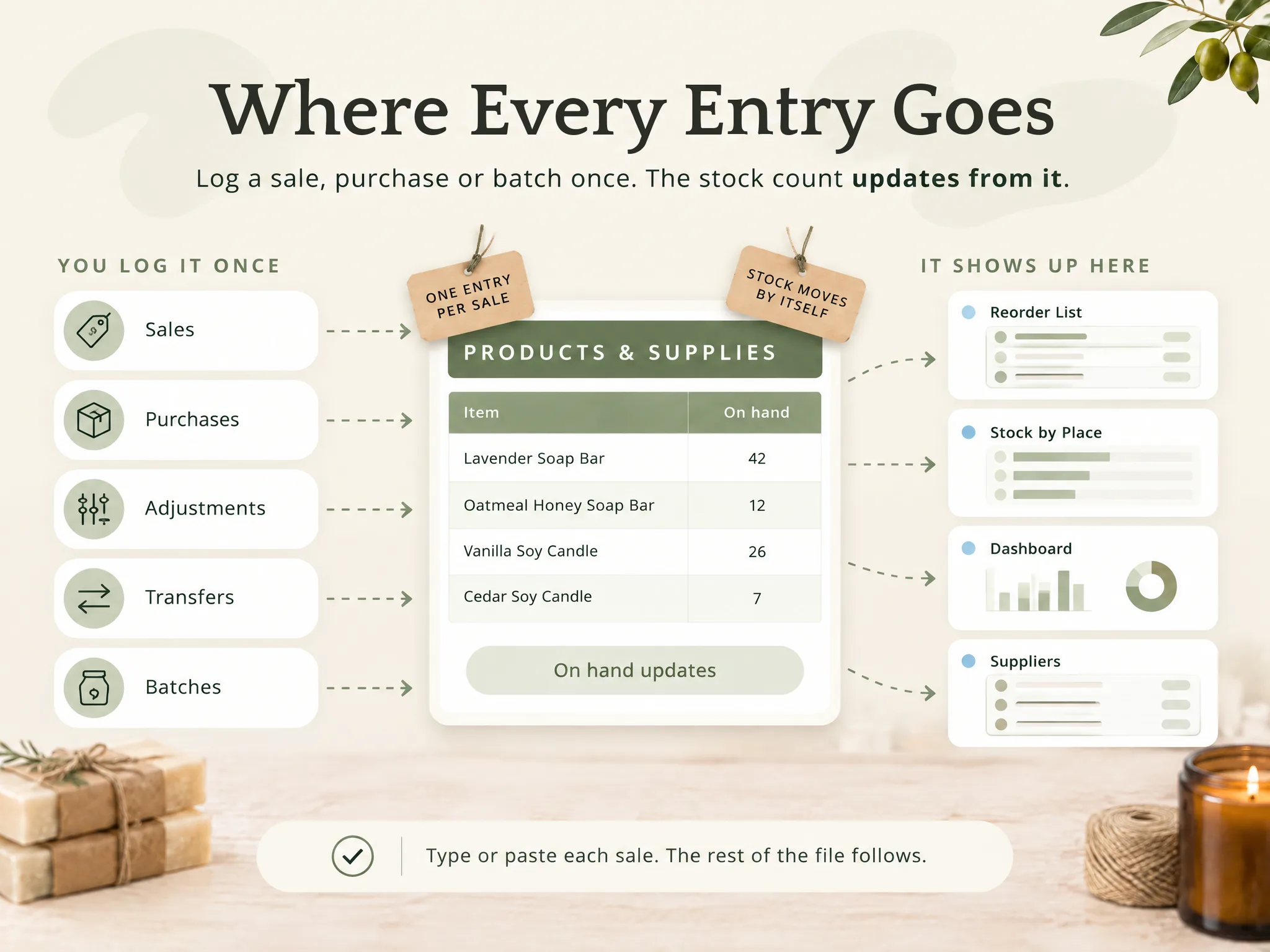
Follow one row. For example, say Lavender Soap Bar sits at 45 and you log a sale of 3 at the Shop. On hand reads 42, and the shop's own count drops by 3. Nothing else is typed, and the item list, the reorder flag and the place totals all read from that one row.
Now a batch. Logging the soap batch adds 24 finished bars and takes the oils, butters and bands out of supplies, whereas without a batch row you either forget the supplies or subtract them by hand, and that is where the second count starts to drift.
At month end the item list answers three questions without any extra work: what is running low, what to reorder from which supplier, and which place sold what. A plain list can't answer the third one, because it never knew the place.
What Actually Keeps an Inventory Spreadsheet Alive
Inventory sheets usually die from one cause, which is that the weekly routine gets skipped, while the formulas themselves rarely break. Four habits keep a sheet running for years instead of weeks.
- One log, one row per movement. Sales, purchases, adjustments and transfers each get a tab.
- A place on every row. It costs one dropdown and prevents the single-total trap.
- A 15-minute weekly check. Look at the running-low flags, log what arrived, fix any difference as an adjustment.
- A starting point that is already linked. Building the connections between tabs is the part that eats evenings. A file with the linked tabs built lets you start logging on day one.
A spreadsheet also has honest limits. It does not connect to an online shop or a till, and it does not scan barcodes. You log or paste each sale. If that routine is too much, an app is the better fit.
One more boundary: a cost column in an inventory sheet is for your own tracking. If you need to know how inventory is treated for taxes, read the Inventories section of IRS Publication 334, Tax Guide for Small Business and ask a tax professional about your own case.
How the Ultimate Inventory Tracker Handles This
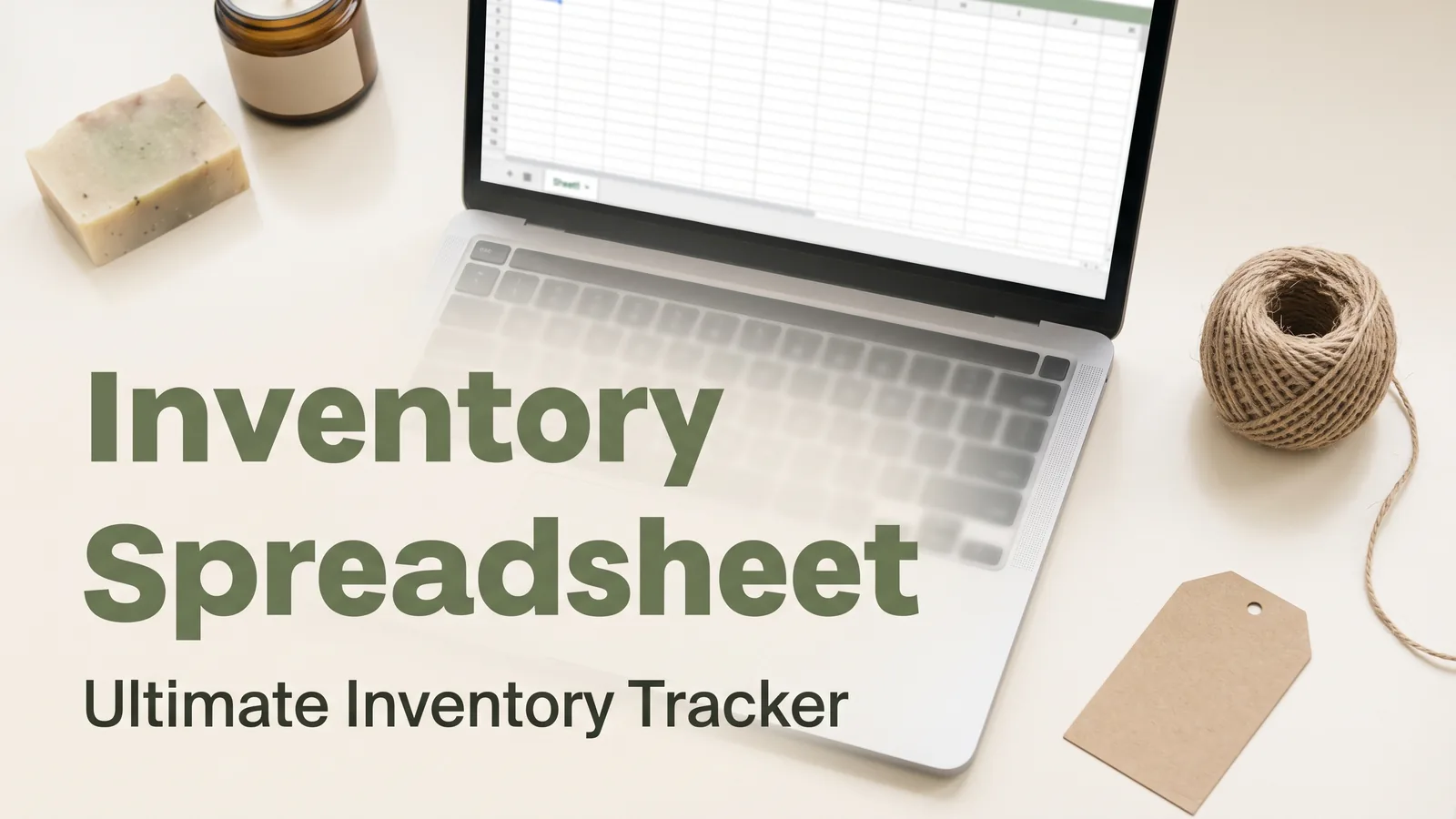
The Ultimate Inventory Tracker (by Cosmo Suite: one Google Sheets and Excel file, 12 tabs, $9 once) is built around the log. You enter a sale, a purchase, an adjustment, a transfer or a batch once, and on hand, the Reorder List and stock by place follow from it.
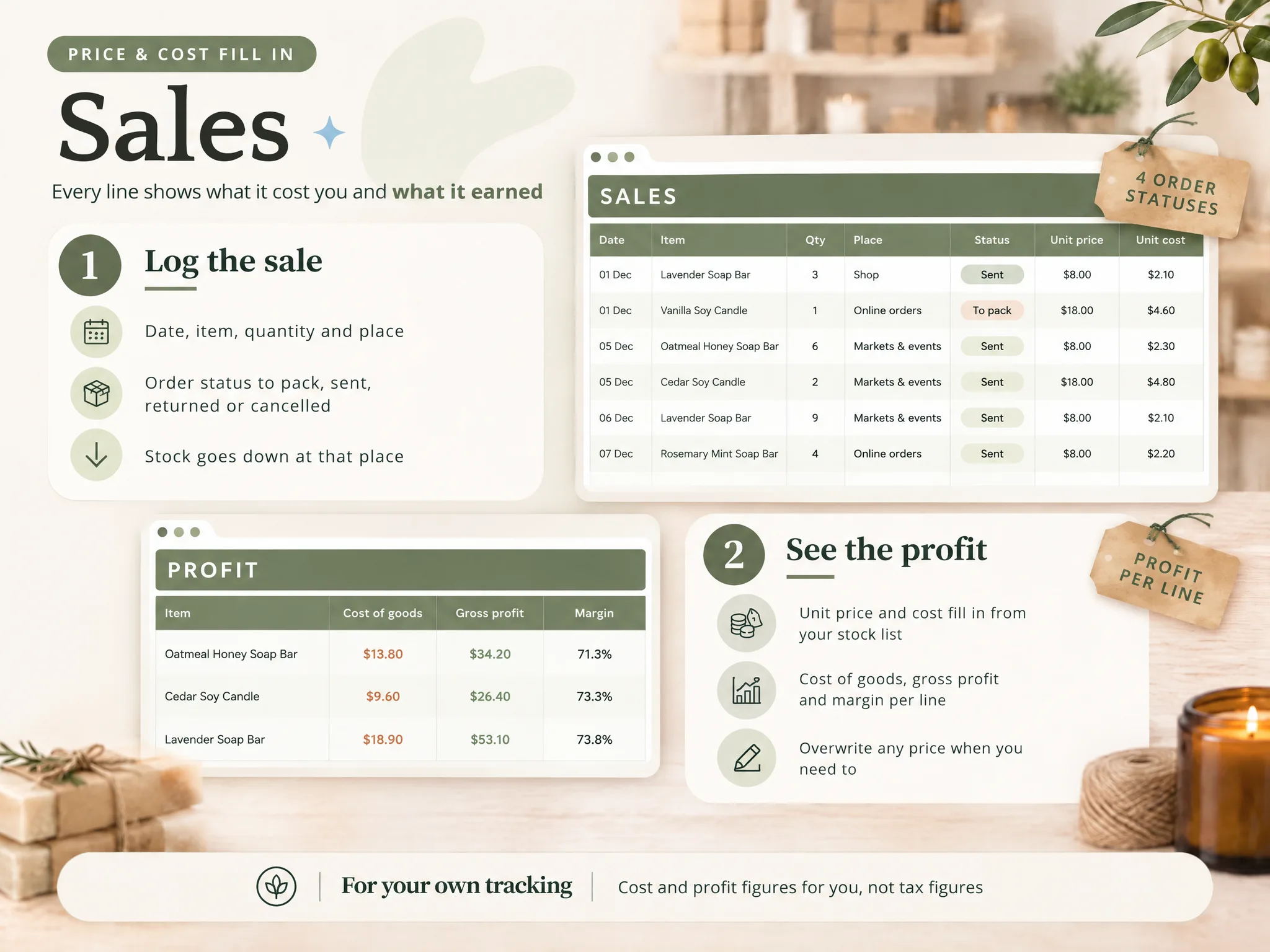
Cost and profit per product are in the file too, for your own tracking and not as tax figures. For makers, a Recipes tab holds the supplies in one finished piece, and Batches takes supplies out and puts finished pieces in. It comes as a sample copy with a small maker's example and as a clean copy, in Google Sheets and Excel, plus printable pages for a market-day tally and a stock count.
It does not connect to a shop or a till and it does not scan barcodes. If you want one inventory file with sales, purchases and batches already linked, it is a one-time purchase.
We make this file, so weigh our view accordingly. We recomputed the formulas and figures in this post by hand from the sample copy, and we checked Ply's and Microsoft's pages on 5 October 2026. Our editorial policy explains how we fact-check, our about us page says who writes these posts, and you can contact us through the site if something here is wrong.
Frequently Asked Questions
What columns should an inventory spreadsheet have?
Start with nine: item, SKU or code, category, unit, on hand, reorder level, unit cost, price and place. On hand should be a formula, not a typed number. Add supplier and a status flag once the basics work. Anything beyond that is optional until you notice a question the sheet can't answer.
Is Excel or Google Sheets better for inventory?
It depends on where you work. Excel suits you if you like working offline and already have it. Google Sheets opens in a browser and in the phone app, which helps at a stall. The formulas in this post, SUMIFS and IF, work the same in both, so you can switch later.
How do I update stock automatically in a spreadsheet?
Log every movement as a row on its own tab (sales, purchases, adjustments) and let a formula add them up for each item. You still type each sale once, but you never edit the on hand number. A sheet doesn't connect to a shop or a till, so you log or paste the sales yourself.
How often should I update my inventory spreadsheet?
Log sales the same day, or at the end of a market day, and then spend about 15 minutes each week checking the reorder flags. Do a full physical count once a month or after a busy event, and enter any difference as an adjustment with a written reason.
Can an inventory spreadsheet handle more than one place?
Yes, if every movement row carries a place. A sale at the shop lowers the shop's stock, and a transfer moves pieces from home to a market stall. Without a place column you only get one total, which hides the fact that the shop is empty while a box sits at home.
When do I need inventory software instead?
Move to an app if you need barcode scanning, a live link to an online shop or till, or many people updating at once. A spreadsheet can't do those. If you sell a few hundred items from one or two places and can log each sale, a spreadsheet is usually enough.
Frequently asked questions
What columns should an inventory spreadsheet have?
Start with nine: item, SKU or code, category, unit, on hand, reorder level, unit cost, price and place. On hand should be a formula, not a typed number. Add supplier and a status flag once the basics work. Anything beyond that is optional until you notice a question the sheet can't answer.
Is Excel or Google Sheets better for inventory?
It depends on where you work. Excel suits you if you like working offline and already have it. Google Sheets opens in a browser and in the phone app, which helps at a stall. The formulas in this post, SUMIFS and IF, work the same in both, so you can switch later.
How do I update stock automatically in a spreadsheet?
Log every movement as a row on its own tab (sales, purchases, adjustments) and let a formula add them up for each item. You still type each sale once, but you never edit the on hand number. A sheet doesn't connect to a shop or a till, so you log or paste the sales yourself.
How often should I update my inventory spreadsheet?
Log sales the same day, or at the end of a market day, and then spend about 15 minutes each week checking the reorder flags. Do a full physical count once a month or after a busy event, and enter any difference as an adjustment with a written reason.
Can an inventory spreadsheet handle more than one place?
Yes, if every movement row carries a place. A sale at the shop lowers the shop's stock, and a transfer moves pieces from home to a market stall. Without a place column you only get one total, which hides the fact that the shop is empty while a box sits at home.
When do I need inventory software instead?
Move to an app if you need barcode scanning, a live link to an online shop or till, or many people updating at once. A spreadsheet can't do those. If you sell a few hundred items from one or two places and can log each sale, a spreadsheet is usually enough.