Inventory Count Sheet: Count Stock and Fix the Record
Inventory count sheet: how to record a count and update stock quantities. Count one place at a time, check differences, and log a dated adjustment.
By Ultimate Inventory Tracker by Cosmo Suite · Editorial policy
Published · 8 min read
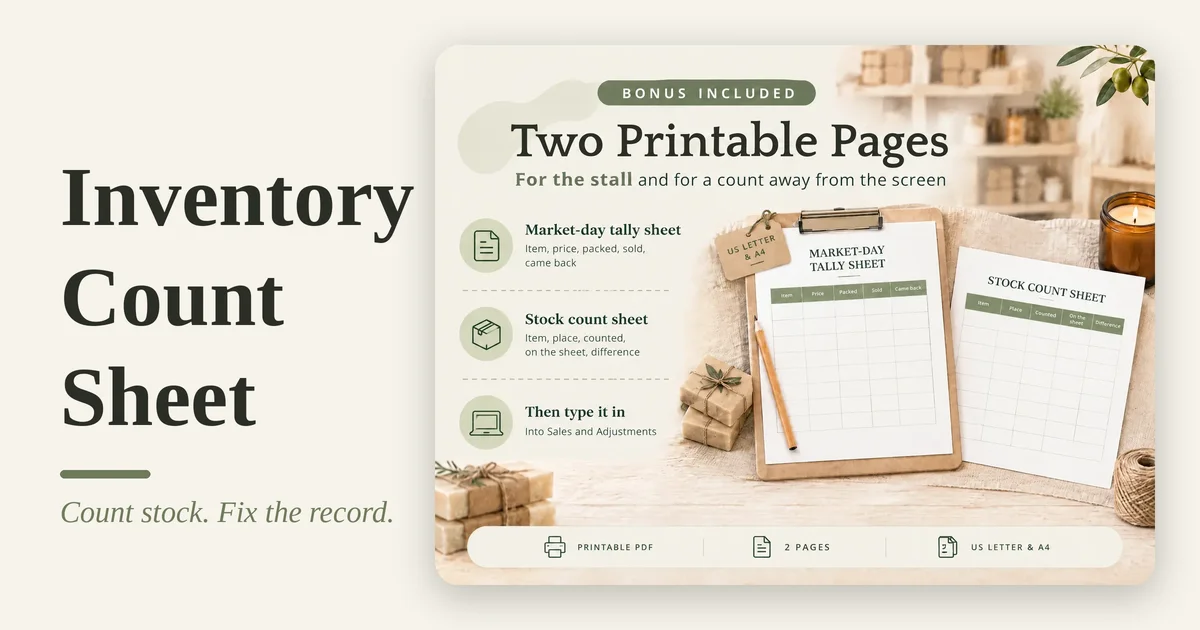
An inventory count sheet is a form for recording the quantity you can physically see. List the item, unit, and place, then write the counted quantity and date. Use a separate copy to compare that count with the quantity already in your stock record. For a connected record after the count, a spreadsheet inventory tracker can keep adjustments beside sales, purchases, and transfers.
For a maker, a count can cover finished candles on a shelf, wax in a tub, or boxes packed for a market. The sheet should help you identify each one without guessing at a scent, size, unit, or location.
In Short
- Count one defined place at a time, and keep the unit consistent.
- Record the physical number before comparing it with the old stock figure.
- Check unclear differences, then update the stock record with a dated adjustment.
- A count sheet records a snapshot. It does not record every sale or purchase between counts.
What goes on an inventory count sheet?
An inventory count sheet needs enough detail to identify an item and write down the quantity you physically counted. Start with item name or code, unit, place, counted quantity, and date. Add a second count or note when you need to investigate a difference.
| Field | What to write | Why it helps |
|---|---|---|
| Item name or code | Product, supply, and variant | Distinguishes similar items |
| Unit | Each, box, oz, g, or another countable unit | Keeps quantities comparable |
| Place | Shop shelf, storage box, or market stock | Prevents one place being counted twice |
| Physical count | The quantity you can see | Records the count before reconciliation |
| Count date | The day the quantity was checked | Makes the snapshot traceable |
| Note or recount | A short detail or second count | Flags a row that needs a closer look |
For a blind count, leave the expected quantity off the counter's copy. That way the person counting records what is on the shelf without first seeing the number in the spreadsheet. Keep the expected quantity on a reconciliation copy for the comparison afterward.
Choose the unit before you start. If wax is stored and used by weight, count it in ounces or grams. If jars are bought by the case but used one at a time, decide whether your count is cases or individual jars. Do not add 12 jars to a row measured in cases.
Formula box: Difference = physical count − recorded quantity. This is a quantity check, not a dollar valuation. Keep the count and any financial treatment separate, and ask an accountant about tax or accounting questions.
The maker's month, worked through
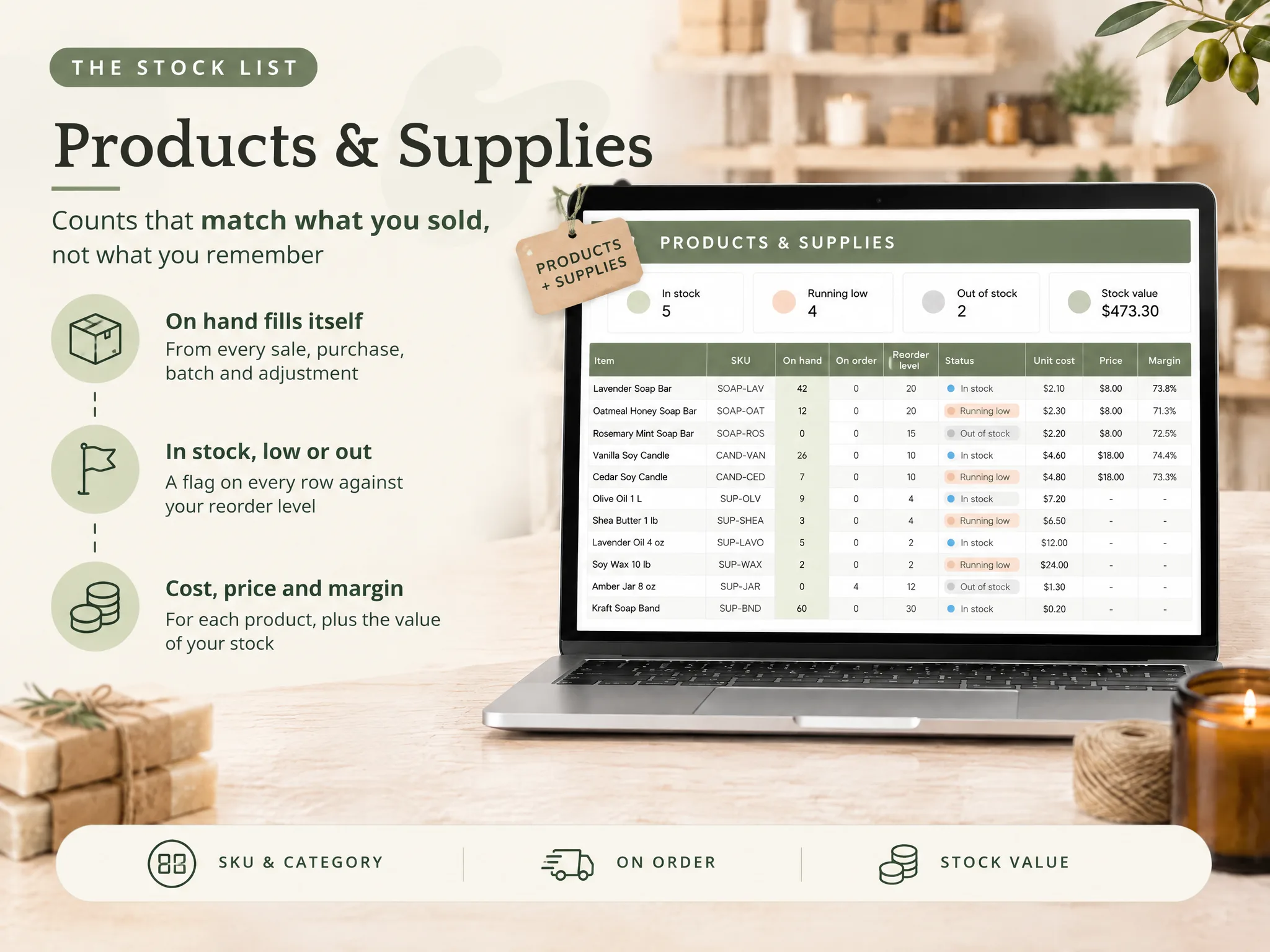
Suppose a soap-and-candle maker has 24 products and supplies across Shop, Online orders, and Markets & events. In an illustrative month, the maker logs 41 sales and two batches, one of 24 soap bars and one of 18 candles. Before a weekend market, the maker counts finished candles, soap bars, wax, and jars. The same candle scent in the shop and market box needs two rows if the seller wants to see each place separately. These figures are an example, not a sales benchmark.
The maker writes the item name, unit, and place first. Then she counts the pieces or weighs the supply and writes the physical quantity. The spreadsheet's current number stays on a separate copy until the count is complete. Suppose three rows are flagged as running low; the count can confirm which quantities need a restock check without assuming every flag is correct.
After counting, she compares each physical number with the recorded one. A candle row that differs by two gets checked against recent sales, samples, and any transfer to the market box. If the two pieces were used as samples, the reason is clear. If nobody can explain the difference, she recounts before changing the record.
Clear labels, stable units, and notes about stock movements are enough to make a simple count useful. Shopify describes a stocktake as a physical count at a point in time, then compared with the business's inventory record. Your next step depends on how you keep that record.
Inventory count sheet: what to use when
Use a printable sheet for a walk-through when writing beside the shelf is easier. Use a spreadsheet when you need to sort rows, compare places, or keep the count beside other stock details. A count process works best when the format matches the room and the way you store items.
| Your counting situation | Count format | Check before closing the count |
|---|---|---|
| One shelf or storage box | A short printed list | Item, unit, place, and count date |
| Several rooms or selling places | One section per place | Mark each place complete once |
| Items with sizes, colours, or scents | One row for each separately counted variant | Read the variant label before writing the quantity |
| Supplies measured by weight and pieces | Separate rows with clear units | Do not mix oz, g, cases, and each |
| A difference that needs research | Count copy plus reconciliation copy | Recount and note the reason before adjustment |
Shopify's inventory stock count documentation describes a count as a physical quantity at a particular location checked against the quantity already recorded. For a small maker, the separation also works with a spreadsheet or paper list: first record what is there, then check what changed in the record.
How to count stock without losing your place
Set the boundaries before you start. Choose the place, decide which items belong in the count, and mark the time. If sales or deliveries continue during the count, note them or pause movement in that area until you finish. Otherwise the number can change while you are comparing it.
- Prepare the rows. Use current item names and a unit for each one. Separate variants that have different stock quantities.
- Work through one place. Move in a consistent direction, such as shelf by shelf. Mark items as you count them and mark a place complete only after every relevant row is checked. Cornell's inventory guidance also recommends marking counted items, which helps prevent a second count of the same shelf.
- Write what you see. Record the physical quantity before looking at the expected count. Note open packs, damaged goods, or items that are not ready to sell when those details matter to your record.
- Review unclear rows. Recount the item if the number looks surprising or the unit is uncertain. A quick second look is easier than correcting the wrong row later.
- Compare after counting. Put the physical quantity beside the recorded quantity. Check recent sales, purchases, transfers, batches, and samples that could explain a difference.
- Update the stock record. Once the count is confirmed, record an adjustment with the date and a short reason. Keep the original count sheet if you need to understand the change later.
Do not use a count as a substitute for logging each movement. A sheet that is accurate on Monday can be out of date after a Tuesday sale. Shopify's stock count instructions treat a count as a record for a selected place, then have a manager review results before inventory changes. A small shop can keep a simple count rhythm, but the record still needs each sale, purchase, or use that changes stock.
What to check when the count does not match
Before changing a number, check whether the row describes the same item and place you counted. Many count differences come from a variant, unit, or location mismatch rather than a mysterious loss. Compare the label in your hand with the row, then check whether stock moved during the count.
If it still differs, recount the physical item. Then look at recent sales, received purchases, transfers, batches, breakage, samples, and gifts. Use only the records that apply to that item. A short reason in the adjustment helps you remember why the sheet changed.
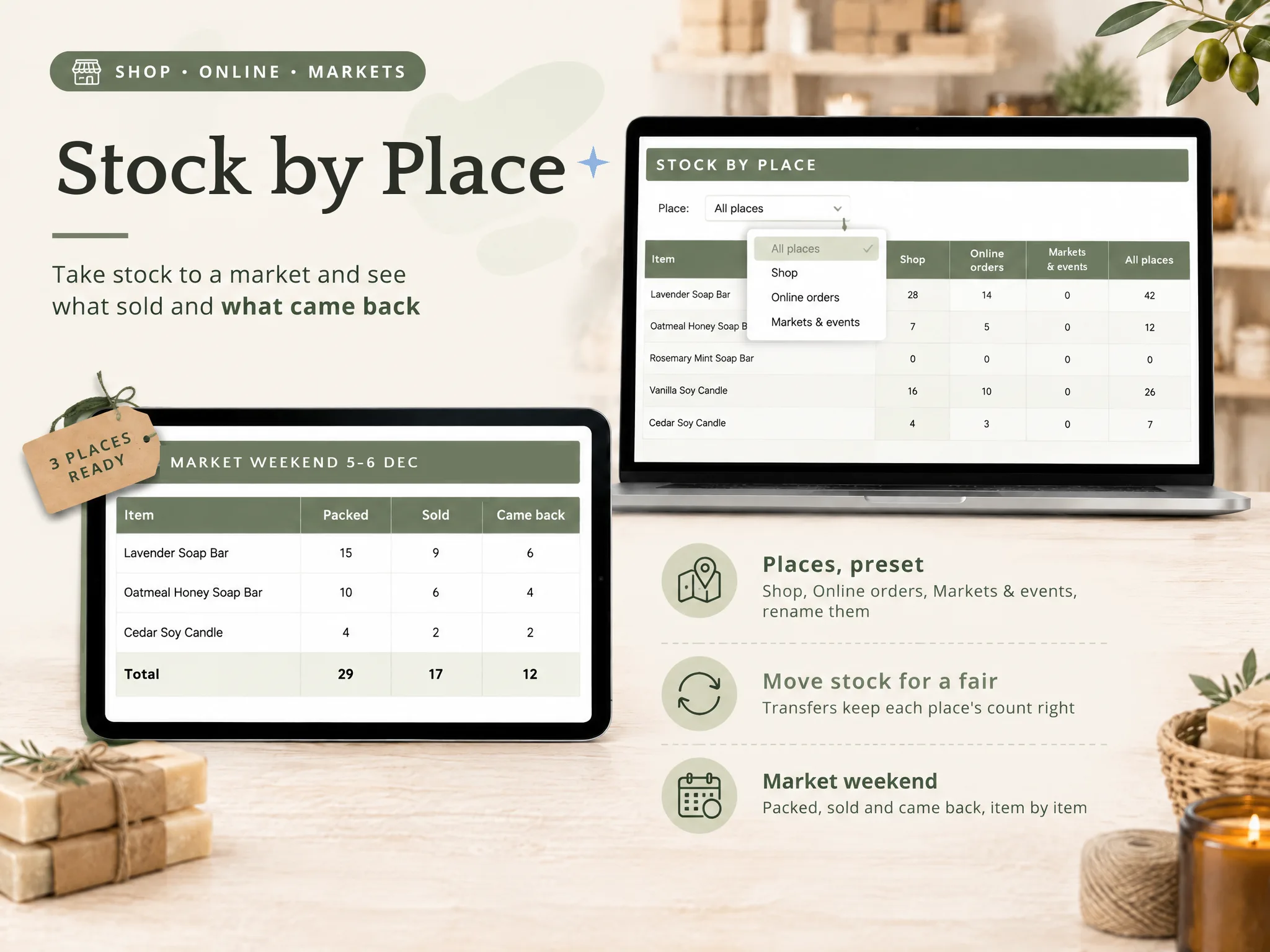
For the maker in the example, a market box is a separate place from the shop shelf. A sale from that box should reduce the market quantity. A transfer back to the shop should move units between places, not create extra stock. If the count covers both locations, add the two verified quantities only when you need a total across places.
The inventory list template guide covers the core item fields. The inventory spreadsheet walkthrough shows how a list can sit beside movement logs.
The part that keeps the count useful
Decide how you will use a confirmed difference before the first item is counted. Finish with a corrected record or a note about what still needs checking, especially before a restock or market pack.
For every difference, keep three details together: the physical count, the previous recorded number, and the confirmed reason or “unexplained” note. Recount first when the difference could come from a missed shelf, a case-versus-each mix-up, or a sale during the count. Do not quietly overwrite the old number; an adjustment gives you a dated trail.
If you sell in more than one place, choose whether the count is by place or for the whole business. A combined total can hide the fact that all remaining pieces sit at the stall instead of the shop. Tracking each place makes the next transfer or market pack easier to plan.
It still depends on people to enter sales, purchases, and transfers and to count the physical stock. It does not scan shelves or connect directly to an online shop or till.
How the Ultimate Inventory Tracker handles this
The Ultimate Inventory Tracker printable stock count pages give you a paper route for counting, while its Products & Supplies and Adjustments tabs hold the spreadsheet record. Enter a confirmed difference as an adjustment with a reason, then the connected stock views update from that entry.
The file also separates stock by place and includes a Reorder List. That can help a maker compare what is on the shop shelf with what is packed for a market. It is one Google Sheets file and one Excel file, with the same 12 connected tabs and printable PDF pages. The sheet does not scan items, connect to a shop or till, or decide whether a financial adjustment is right for your accounts. Its printable pages are for recording a physical count; its Adjustments tab is where a confirmed quantity change goes.
For details about the people and process behind this guide, read the About page and Contact. Fact-checking for this guide follows the editorial policy.
If your current list only needs a periodic physical count, a printed page may be enough. If you want sales, purchases, transfers, batches, and adjustments to feed one on-hand view, see the inventory tracker with count and adjustment tabs. Keep your count date and note with the record so you can explain how the quantity changed.
Frequently asked questions
What should an inventory count sheet include?
Include an item name or code, the unit you count, the place, a blank counted-quantity field, and the count date. A second count or note field helps when a number looks wrong. Keep the expected quantity off a blind count copy if you want counters to record what they see without being guided by the old figure.
How do I make an inventory count sheet in Excel?
Create one row for each item you need to count separately. Add columns for the item, unit, place, physical quantity, and date. Print or use the sheet on a device, then compare the count with your stock record and enter a dated adjustment for a confirmed difference.
Should counters see the expected quantity?
It depends on how you want to check the count. Hiding the recorded quantity can reduce the chance that a counter copies it by mistake. Keep the expected figure on a separate reconciliation copy, then compare after the physical count.
What do I do when the physical count does not match the sheet?
Check the item, unit, place, and any stock movement during the count. Recount the row if the difference is still unclear. Once you confirm the quantity, record an adjustment with the date and a plain reason such as breakage, sample, or count correction.
How often should a small business count inventory?
There is no single schedule for every shop. Count when a decision depends on a reliable quantity, after a move or event if stock is hard to reconcile, and at a cadence you can keep. A full count checks everything; cycle counting checks a smaller group at a time.
Can a spreadsheet inventory count sheet update stock automatically?
A printable count sheet is only a record of the quantity someone counted. A connected spreadsheet can update its on-hand view when you enter a confirmed adjustment, but it will not know what is on a shelf until a person counts it. It also does not connect to a shop or till unless that feature is provided separately.
Sources
Keep reading

Inventory Spreadsheets
Inventory List Template: The Columns a Small Seller Needs
Inventory list template: start with a clean count, then add fields that help you spot low stock, compare variants, and plan a sensible restock.
· 8 min read
Inventory Spreadsheets
Inventory Spreadsheet: The Columns You Need and How to Stop Updating Stock by Hand
Inventory spreadsheet: the 9 columns to set up first, the formulas that keep stock on hand right, and a maker's month worked through 41 sales and 2 batches.
· 9 min read
Inventory Spreadsheets
How to Make an Inventory Spreadsheet in Excel in 8 Steps
Build an Excel inventory spreadsheet with an item list, movement log, SUMIFS stock formula and reorder flag. See where a simple file needs more.
· 7 min read
