Inventory List Template: The Columns a Small Seller Needs
Inventory list template: start with a clean count, then add fields that help you spot low stock, compare variants, and plan a sensible restock.
By Ultimate Inventory Tracker by Cosmo Suite · Editorial policy
Published · 8 min read

Inventory list template is a set of fields for recording items, quantities, and restock details. Start with one row per item and a count you can verify on the shelf.
For a maker or small shop, the useful list is the one you can keep current. Begin with item, unit, quantity, place, and count date. Add supplier or reorder details when you use them. If sales and purchases keep making your numbers drift, you need a movement log beside the list.
In Short
- Keep one row for each item or variant you count separately.
- Treat a manually updated list as a snapshot. Record stock movements if the count changes between checks.
- Add a field only when it helps you count, find, or restock an item.
What belongs in an inventory list template?
Inventory list is a dated snapshot of items and quantities you have checked. Keep its first version short: identify each item, say how you count it, record the quantity you can see, and note where you found it. A second person should be able to read a row and locate the item it describes.
| Field | What to enter | Keep it clear by |
|---|---|---|
| Item name | A plain name you recognize | Name the product and variant, not just the collection |
| Item code | A short unique code, if you use one | Give each separately counted variant its own code |
| Unit | Each, box, oz, g, or another countable unit | Use the same unit every time for that item |
| Quantity on hand | The count you can confirm | Label it as a count, not a live total, if entries are not logged |
| Place | Shelf, room, stall, or storage area | Use the same place names across the sheet |
| Count date | The date the quantity was checked | Update it after a physical count |
| Reorder level | The point at which you want to buy more | Set it only when you know what low stock means for that item |
This is enough to find an item, count it, and notice when a restock may be due. A template can add cost, supplier, description, size, status, and order fields. You do not need every column on day one.
If you need a broader setup with formulas and separate logs, start with this inventory management spreadsheet guide. It walks through the structure behind a stock list.
Formula box: For a snapshot list, quantity on hand = the number you counted. For a movement-based tracker, quantity on hand = starting count + stock received - stock sold or used + adjustments.
NetSuite describes an inventory list as a living record that changes as stock moves in and out. To keep a count current, log those movements somewhere or update the quantity after each change. A list with no movement record relies on someone remembering to revise it.
The maker's month, worked through
Stock movement log is a record of entries that change the quantity on hand. A boutique with 60 size-and-colour SKUs needs one row for each variant whose quantity it wants to see separately. A shirt in one size and colour has a different stock count from the same style in another size or colour.
That example changes how you set up the list. “Blue shirt” is too broad if you need to know whether a specific size is left. Use a name such as “Blue shirt, small” and a separate code for “Blue shirt, medium.” Keep the parent style in a category or collection field if you want to group the variants later.
The same rule works for maker supplies. If two waxes come in different units or have different reorder points, list them separately. A finished candle and the wax used to make it are also different items. One is ready to sell; the other is a supply that goes into a batch.
Do not create a new row for every detail. Add a column when it changes how you count, find, or restock the item. If you never filter by colour, for example, a colour column may be enough. If colours run out at different times, separate rows make the count clearer.
Inventory list template: what to use when
Choose the template by the question you need it to answer. A one-page list can be enough for a periodic count. A movement log earns its extra columns when the count changes between those checks.
| Your situation | A simple list can do this | Add this when the list falls short |
|---|---|---|
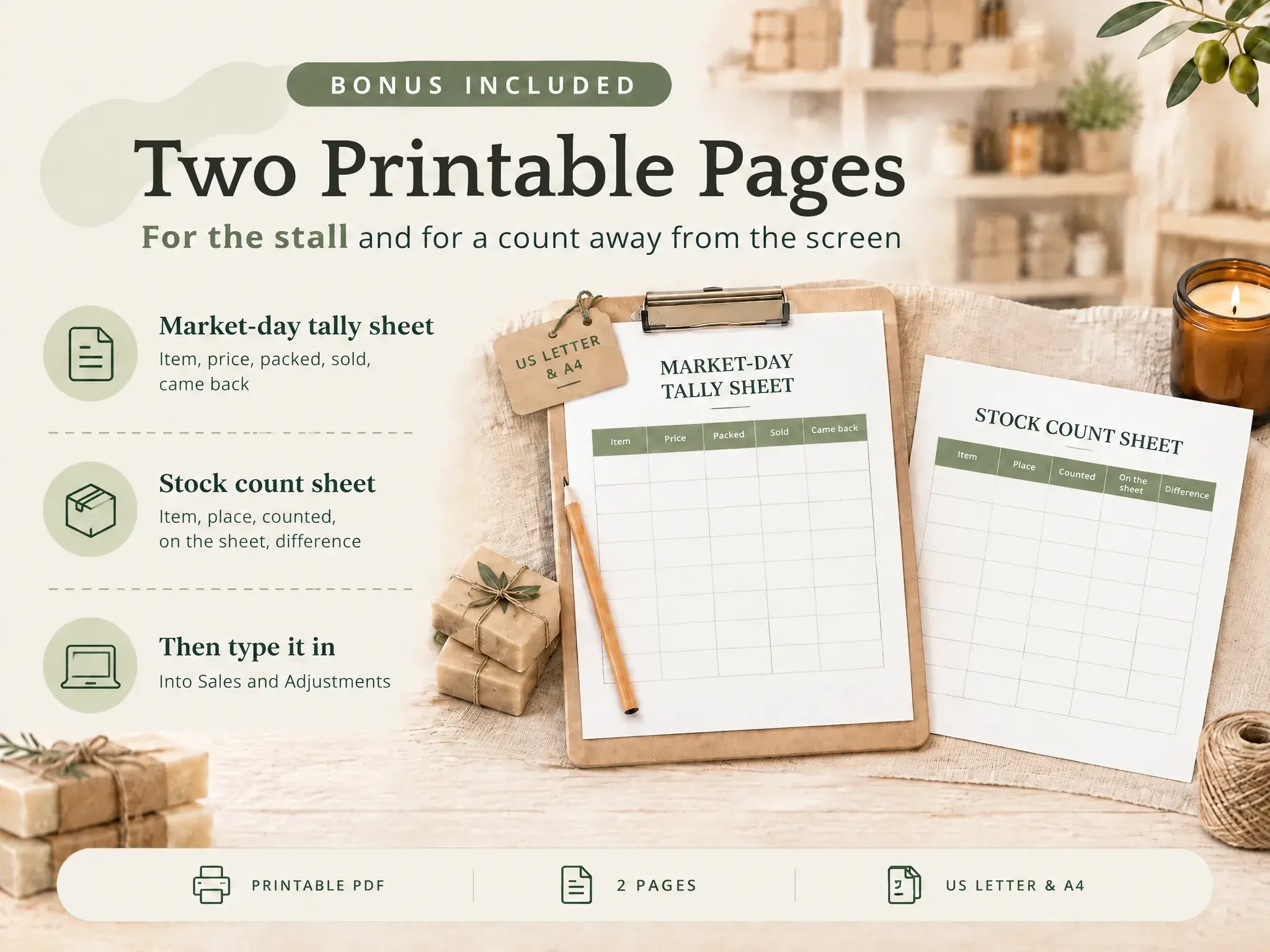
| You count a small set of items now and then | Show item, unit, quantity, place, and count date | Add a count sheet for the next full check |
| You have sizes, colours, scents, or materials | Keep one row for each separately counted variant | Add a parent category to group related rows |
| You restock from different suppliers | Show the usual supplier beside the item | Keep purchase dates and quantities in a separate log |
| Products sit in more than one place | Record one place per row or maintain a count by place | Use a transfer record when stock moves between places |
| Sales or batches change stock every week | Hold the last confirmed quantity | Add entries for sales, purchases, adjustments, or batches |
Microsoft’s current Excel gallery includes inventory lists, including one with reorder highlighting. Smartsheet also publishes simple and printable list templates, with fields for quantity and location. Those examples show the range: some lists are count sheets, while others hold more details or track movement. Choose the simplest format that answers the stock question you have.
When does a stock list need more than one row per item?
Give a product a separate row whenever you need to count it separately. Size, colour, scent, material, pack size, or location may each split a single product name into several stock lines.
Suppose your list has a single row called “cotton tote.” If the natural and printed versions have different counts, the row hides which one is running low. Split the variants, or add a variant column and make each variant a separate row. A row should point to a specific count, not a family of counts that you cannot separate.
Use item codes only if they reduce confusion. A code can help when names look alike, product variants share a style name, or you need to match a written count with a product label. Keep the code short enough to type correctly. A code that nobody uses is just another field to maintain.
For supplies, include the unit in the item setup. A jar of pigment counted as “each” cannot be compared with a quantity recorded in grams. If you buy the material by weight and use it by weight, keep the unit consistent or record the conversion method where you can find it.
How do you keep an inventory list accurate?
Start with one physical count, then update the list whenever your process says the count changed. Write down what caused the change, and check the shelf again when the record and the item disagree.
First, choose a cut-off point for the count. Pause sales, purchases, and transfers while you count, or write down movements that happen during the count. Otherwise, the number can change before you finish checking it.
Next, count the item in the unit shown in its row. Keep opened boxes, damaged pieces, and samples separate if you handle them differently. Record the count date so you can tell a fresh number from an old one.
When you notice a mismatch, recount before overwriting the quantity. Then record a short reason, such as breakage, a sample, or a counting correction. Keeping the reason helps you understand why the number changed later.
Finally, set a reminder to review the list at a pace you can keep. The right interval depends on how often stock moves. A weekly seller may check more often than someone who only sells a few pieces each month. That reminder helps keep an old count from looking current.
Which inventory list template should you start with?
Start with a blank or sample template that matches the way you count. A printable sheet can suit a one-time physical count. A spreadsheet is easier to sort and update when items change more often.
| Template type | Useful when | Check before you adopt it |
|---|---|---|
| Printable count sheet | You want to walk a shelf and write down quantities | It has room for item, unit, location, and count date |
| Basic spreadsheet list | You need a searchable record of current stock | Every variant that needs a separate count has its own row |
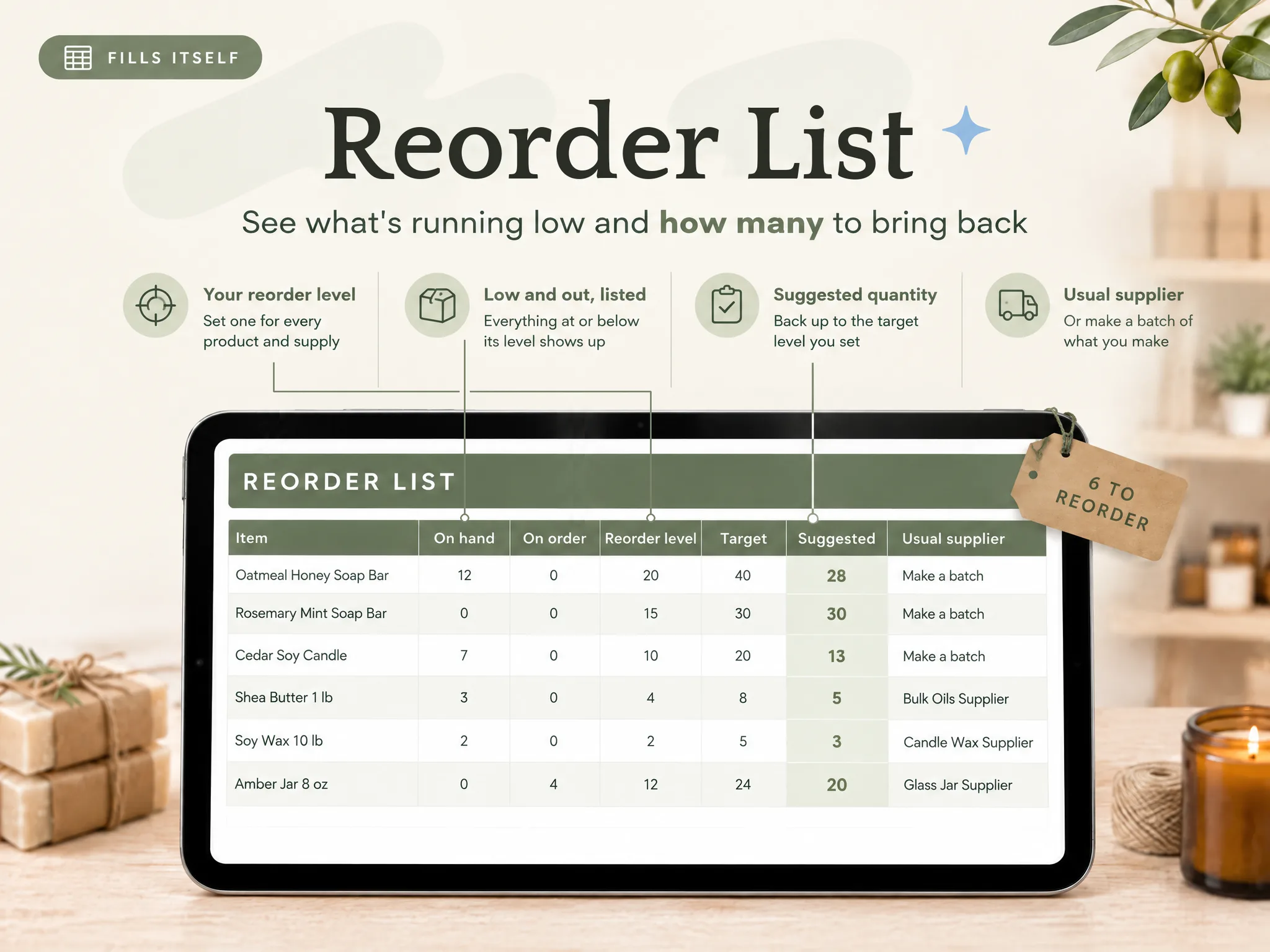
| Reorder list | You need to see items at or below a chosen level | You understand how the file decides that an item is low |
| Stock movement tracker | Sales, purchases, or use change the count between checks | Each movement has a clear entry and a way to correct errors |
Microsoft’s inventory template gallery has editable business and household options. Smartsheet’s inventory list templates include simple, printable, and business examples. Open a sample before you move your data. Check that the columns match your units and variants, and that any formula does the job you expect.
For a spreadsheet made around Excel, our excel inventory template free guide shows another starting format. If you prefer Sheets, see how the inventory tracker Google Sheets guide handles counts and stock movement.
If you want to build a sheet yourself, begin with the first table above. Add a filter to the header row, keep one item per row, and freeze the headings if the list is long. Test the format with a few items before entering everything. A small test catches confusing units or duplicated names before the whole list depends on them.
How the Ultimate Inventory Tracker handles this
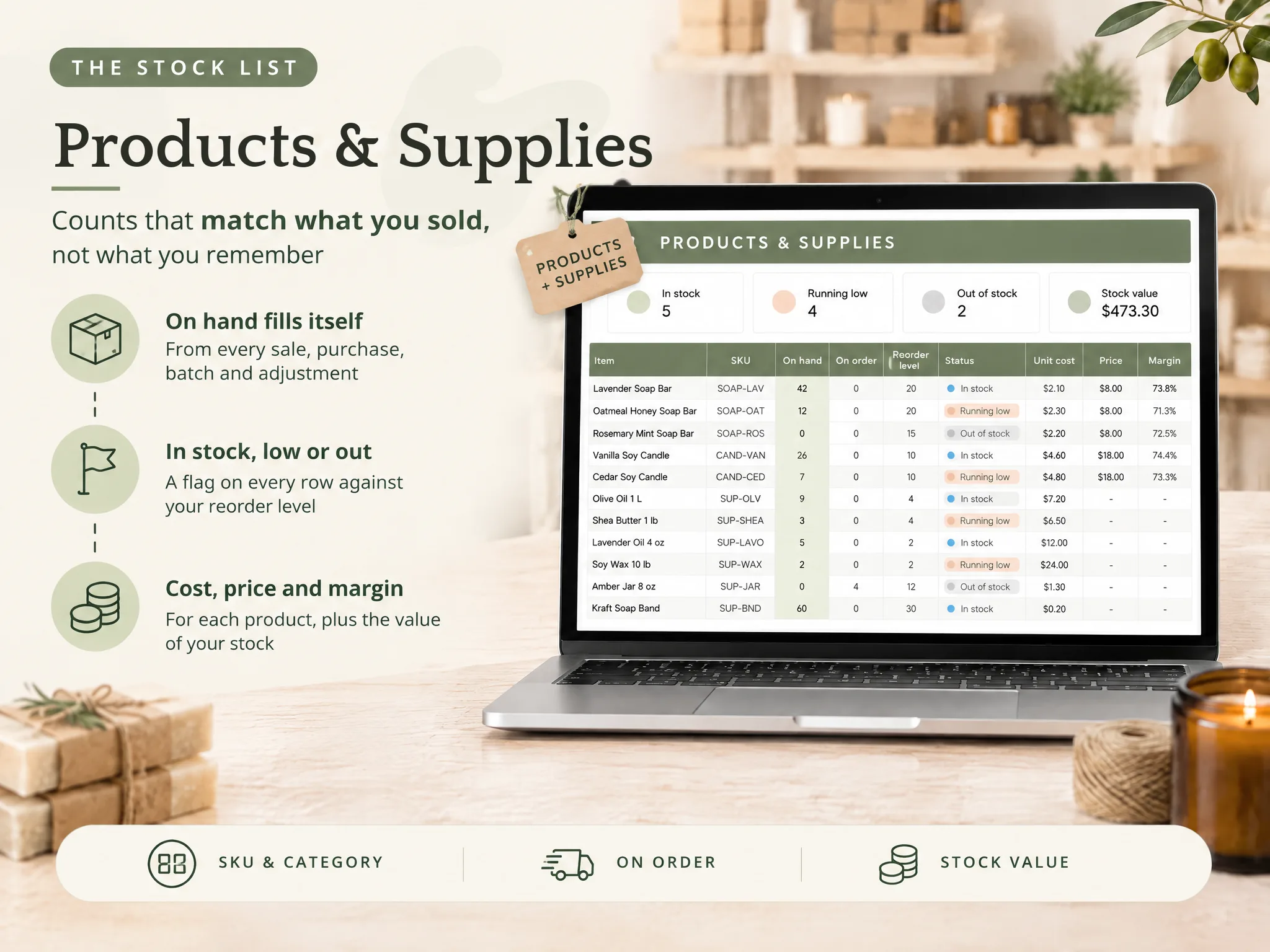
The Ultimate Inventory Tracker (by Cosmo Suite: one Google Sheets and Excel file, 12 tabs, $9 once) keeps the item list beside the entries that change stock. Its Products & Supplies tab holds item details, while sales, purchases, adjustments, transfers, and batches update the on-hand view from the entries you log.
That setup is useful when a count-only list needs a second record for every stock change. The ready-made inventory tracker for a small shop also has a Reorder List and Stock by Place views. You can use a sample copy or a clean copy, then set your currency and places.
The file does not connect to an online shop or a till, and it does not scan barcodes. You log or paste each sale yourself. If you only need a short list for an occasional count, a simpler template may be enough. Our editorial policy explains how we check and update these guides. See About Ultimate Inventory Tracker for the people behind the site. For corrections, contact support@ultimateinventorytracker.site.
Frequently asked questions
What should an inventory list template include?
Start with an item name or code, a consistent unit, quantity on hand, and where the item sits. Add a count date so you know when the number was last checked. Reorder level, supplier, and unit cost help when you restock, but add them only if you use them.
How do I make a simple inventory list?
Use one row per item you need to count. Give each size, colour, scent, or material its own row when you need its count separately. Add a place and a last-counted date, then record a new count when stock changes.
Is a free inventory list template enough for a small business?
A simple template can work when you have a manageable list and can update it after each stock change or count. If you need stock to move from sale, purchase, transfer, and batch records, choose a tracker that connects those entries to its on-hand total.
What is the difference between an inventory list and an inventory tracker?
An inventory list is a snapshot of what you have at a point in time. A tracker also keeps the entries that change the count, such as purchases, sales, adjustments, or transfers. A list can be enough for occasional counts.
Should I list supplies as well as finished products?
List supplies when their quantity affects what you can make or sell. Use a unit you can count consistently, such as each, ounces, or grams. Keep finished products as separate rows so a supply count does not get mixed with ready-to-sell stock.
When should I switch from a basic list to an inventory tracker?
Switch when you keep rewriting the same on-hand figure, need counts by place, or want one logged movement to update several views. If you need barcode scanning or a direct shop connection, a spreadsheet tracker will not provide those features.
Sources
Keep reading
Inventory Spreadsheets
Inventory Spreadsheet: The Columns You Need and How to Stop Updating Stock by Hand
Inventory spreadsheet: the 9 columns to set up first, the formulas that keep stock on hand right, and a maker's month worked through 41 sales and 2 batches.
· 9 min read
Inventory Spreadsheets
How to Make an Inventory Spreadsheet in Excel in 8 Steps
Build an Excel inventory spreadsheet with an item list, movement log, SUMIFS stock formula and reorder flag. See where a simple file needs more.
· 7 min read
Inventory Spreadsheets
Inventory Count Sheet: Count Stock and Fix the Record
Inventory count sheet: how to record a count and update stock quantities. Count one place at a time, check differences, and log a dated adjustment.
· 8 min read
